
How to use Brightspace
This page provides guidance on using Brightspace.
What is Brightspace?
Brightspace is our online learning platform which contains all self-directed study materials. It allows programme members to access learning content at a time and pace that suits them.
Delivery partners, staff members, school induction tutors and mentors are also able to view and monitor the programme members' learning progress.
How to access Brightspace
You can access Brightspace by logging into My Teach First:
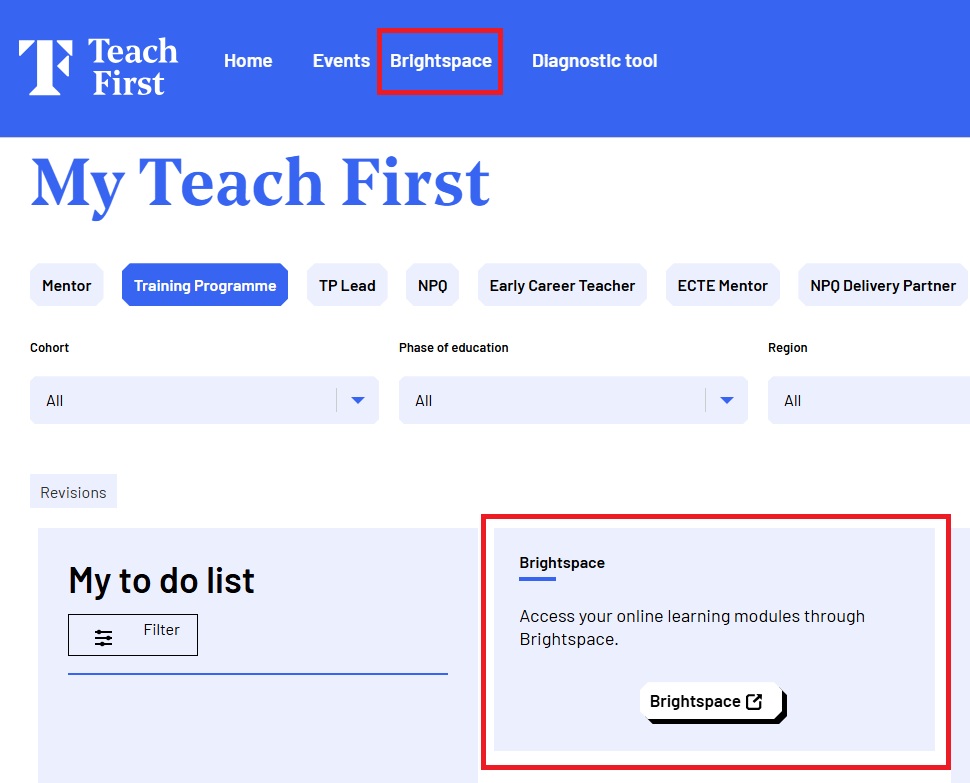
Once you have logged in to My Teach First, select through to the Brightspace homepage. You can do this in two ways. Both access routes will take you to the Brightspace homepage:
- Select the 'Brightspace' button located in the middle of your homepage once you have logged in or select 'Brightspace' from the blue navigation bar at the top of the screen or the button on the homepage itself.
Both options are highlighted in the image below for you.
Brightspace is best accessed using a laptop or computer (though it is also available on mobile and tablet). You'll need a strong internet connection such as through Wi-Fi or broadband rather than a hotspot. We also recommend using the latest versions of Google Chrome, Mozilla Firefox or Microsoft Edge.
Need more help?
- Forgot your My Teach First password? Request a reset email. Use the email you registered with and check your junk or spam folder.
- Check your platform access date, sometimes you can have access to My Teach First, but not to Brightspace, depending on when your allocated programme starts.
- Need to access your delivery partner portal account? Head to the Teach First Portal.
- If you're a coach or coachee not currently enrolled in a programme, please log in directly via Brightspace.
- Follow the guidance from our platform provider, D2L, on how to ensure your browser is ready for Brightspace.